Everything Klaudius does builds up to one moment: a business owner replies and says yes.
The pipeline found them, built them a bespoke website, deployed it, pitched them, followed up. All of that is the work. The "yes" is the payoff, and then, quietly, a small piece of admin appears between you and the money. Someone has to write the bill.
As of this week, Klaudius can do that too (entirely optional, there whenever you want it). You pick one add-on in the app, Send an invoice, and choose the client (say, Bright Smiles).
That's everything you provide, because it already knows everything else: who the client is, their details, your details, and the price you quoted them. (Billing something bespoke: a deposit, an add-on, a negotiated figure? Ask Klaudius with the amount instead.) From that alone it writes the invoice, renders it as a proper PDF (numbered, dated, tax split out, your payment details on it), then writes a short, human covering email, attaches the PDF to it automatically, addresses it to the business owner, and drops the whole thing into your mailbox's drafts folder, ready to go.
Literally all that's left for a human to do is press send.
It already knows almost everything an invoice needs
This is the part that makes invoicing inside Klaudius better than invoicing software: there's no data entry, because the pipeline already holds the data.
It knows the client's business name, the owner's name, their email, and what you quoted them, all recorded when the pipeline found and pitched them. If their street address was never captured, it finds the business's address online and puts it on the invoice. You don't type a customer record into anything. The client is the record.
The one thing it can't know is your side, and it asks for that exactly once, the first time you ever run it. Who you invoice as. Your business address. Whether you charge sales tax, VAT or GST, asked in your country's own terms, with sensible context (a US operator gets told most service work isn't sales-taxable in most states; a UK operator gets asked about VAT registration). How clients pay you, whatever that actually is, printed exactly as you write it: ACH and account details, a check-to address, or your Stripe or PayPal payment link if you'd rather they just click and pay. If you invoice as a registered company, it offers to pull your registered name, company number and registered office straight from the public companies register (in the UK, that's a Companies House lookup happening in front of you), and you confirm what it found. Then it remembers all of it, permanently. Every invoice after your first skips straight to the money.
You confirm the numbers before anything exists
Before it renders anything, it shows you the whole invoice in one message: who it's billed to, the line items, and, if you charge tax, the arithmetic, in full. Say you're a Seattle operator: Washington began taxing custom website development in late 2025, so on a $999 build it adds the tax on top and shows you every number before anything exists: $999.00 + $105.39 sales tax at Seattle's 10.55% = $1,104.39. And if your quote was meant to be tax-inclusive (the way VAT pricing usually works for operators in the UK and Europe), it splits the tax out of the quoted figure instead, so the client pays exactly what they were told.
You confirm once, and it does the rest: a clean, restrained, properly typeset A4 PDF, the kind of document that looks at home next to anything an accountant would send.
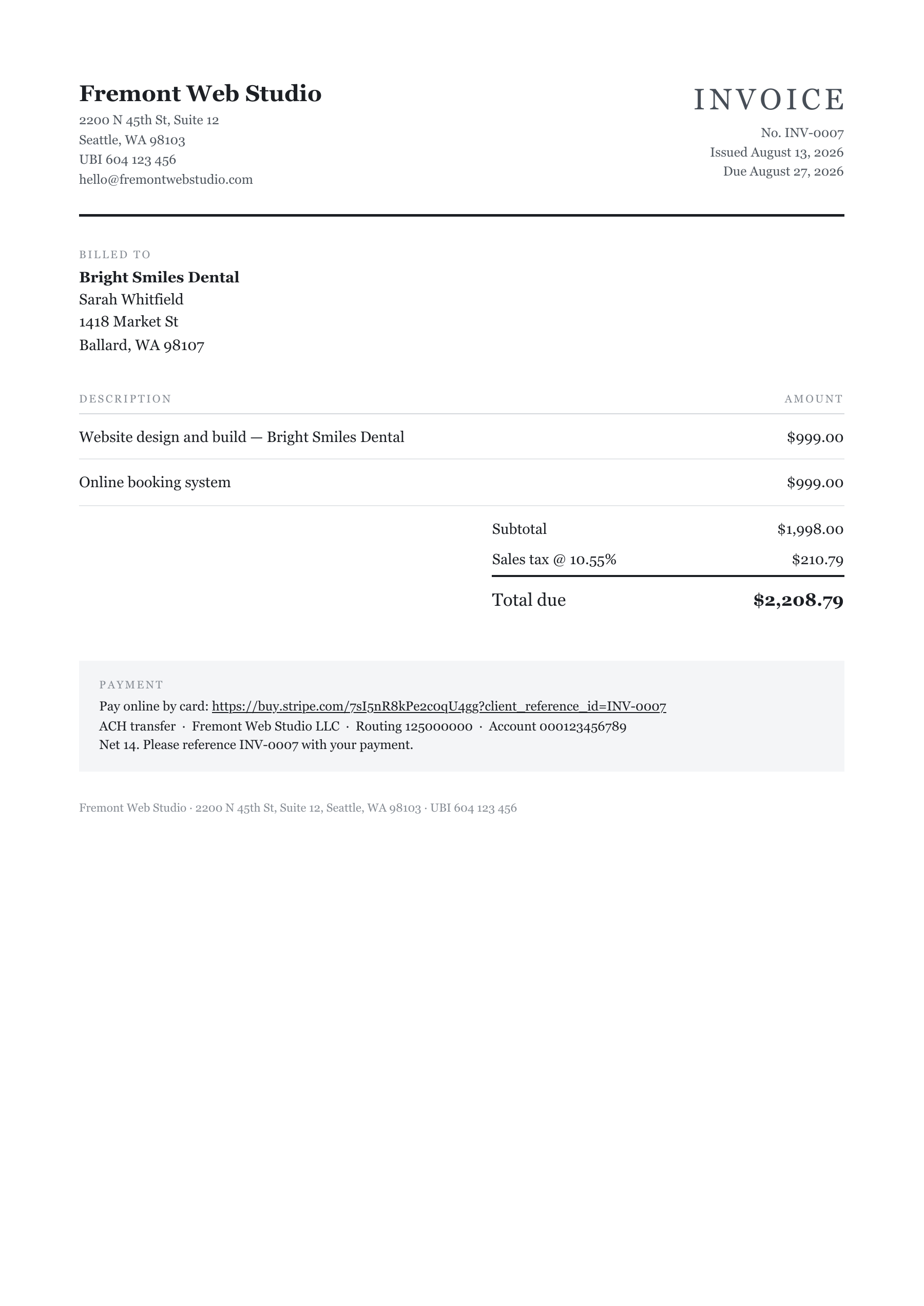
The details are the kind an accountant would nod at. Invoice numbers are sequential and never reused. A correction gets a fresh number that references the one it supersedes, the way proper bookkeeping wants it. The document carries the fields UK and EU invoicing rules require: your registered name and company number, tax registration number, the customer's name and address, per-line amounts, the tax breakdown. And it never plays accountant: it prints exactly the tax label and rate you told it (or no tax line at all), and if you're unsure what you should be charging, it says the honest thing: ask your accountant.
It never sends. That's the feature.
The finished email doesn't go out by itself. It goes to your drafts folder: subject line written, covering note written, the invoice PDF already attached, the business owner already in the To field. There is nothing left to type, attach or address. The last click on a money email is always yours, and it's the only click there is.
We built it that way on purpose. Klaudius sends outreach autonomously all day, but an invoice is different: it's a legal document with your bank details on it, going to someone who owes you money. That deserves ten seconds of your eyes and a deliberate click, and it means the workflow ends with the nicest moment in the product: you open your email, and the bill you didn't write is just there, waiting.
The covering email itself follows everything we know about writing to small business owners: short, warm, contractions, no invoice-speak. The number, the bank details and the payment reference live on the PDF where they belong.
What this replaces
Invoicing software starts at around $20 a month, and then you still do the work: create the customer, type the line items, work out the tax treatment, download the PDF, write the email, attach it. Klaudius does all of that from data it already has, for clients it already knows, inside the same pipeline that won the client in the first place.
And it's not just the build fee. Deposits, a booking system added later, a monthly maintenance retainer: run it again whenever there's something to bill. Each invoice takes the next number from a ledger in your own database and files its PDF next to the client's site. Connect your own Stripe account and every invoice also carries a pay-by-card link whose payment records itself; for a monthly retainer, ask Klaudius for a recurring payment: the client enters a card once and it's charged every month from then on.
Already in your install
Send an invoice is in Klaudius as of today. New subscribers get it out of the box, and if you're already running Klaudius, the app picks it up on its own.
Then, next time a client says yes, if you'd like the paperwork done for you, pick Send an invoice for that business, answer the one-time setup questions, and go check your drafts. Prefer your own invoicing setup? Nothing changes; the add-on just sits there until you want it.
The pipeline finds them, builds for them, pitches them, follows up with them, and now it can bill them too. You keep the click that matters.