Plenty of agencies run on GoHighLevel. The contacts, the pipeline, the follow-up workflows and the phone app on the go are all there, and that's where the day's work happens. Klaudius does the part GoHighLevel doesn't: it finds local businesses that need a website, builds each one a finished site, and pitches it to them. Until now the two sat side by side, and anything you wanted in GoHighLevel you copied across by hand.
If you use GoHighLevel, you can now connect Klaudius to it. It's optional: if you don't use GoHighLevel, nothing changes, and Klaudius works exactly as it does today. Once you connect it, every lead Klaudius finds lands in your sub-account and stays up to date as it moves. Its tags can start your own workflows, so the moment a business opens its site or replies, GoHighLevel can act on it. If you'd rather GoHighLevel sent the pitches, Klaudius writes them and reads the replies back. And when a client signs and wants their website in GoHighLevel too, Klaudius can move it there.
Every lead in your sub-account
Each lead becomes a contact with the business's details, the link to the site Klaudius built for it, and a note on what it found: the kind of business, its Google rating and its social pages.
Each one also gets a deal. Klaudius can set up a pipeline for it in one click, with a stage for each of its steps: Site ready, Pitched, Viewed site, Replied and Won. Or pick one of your own pipelines and choose which of your stages each step moves the deal to; Klaudius suggests them from their names. If you only want contacts, choose no pipeline.
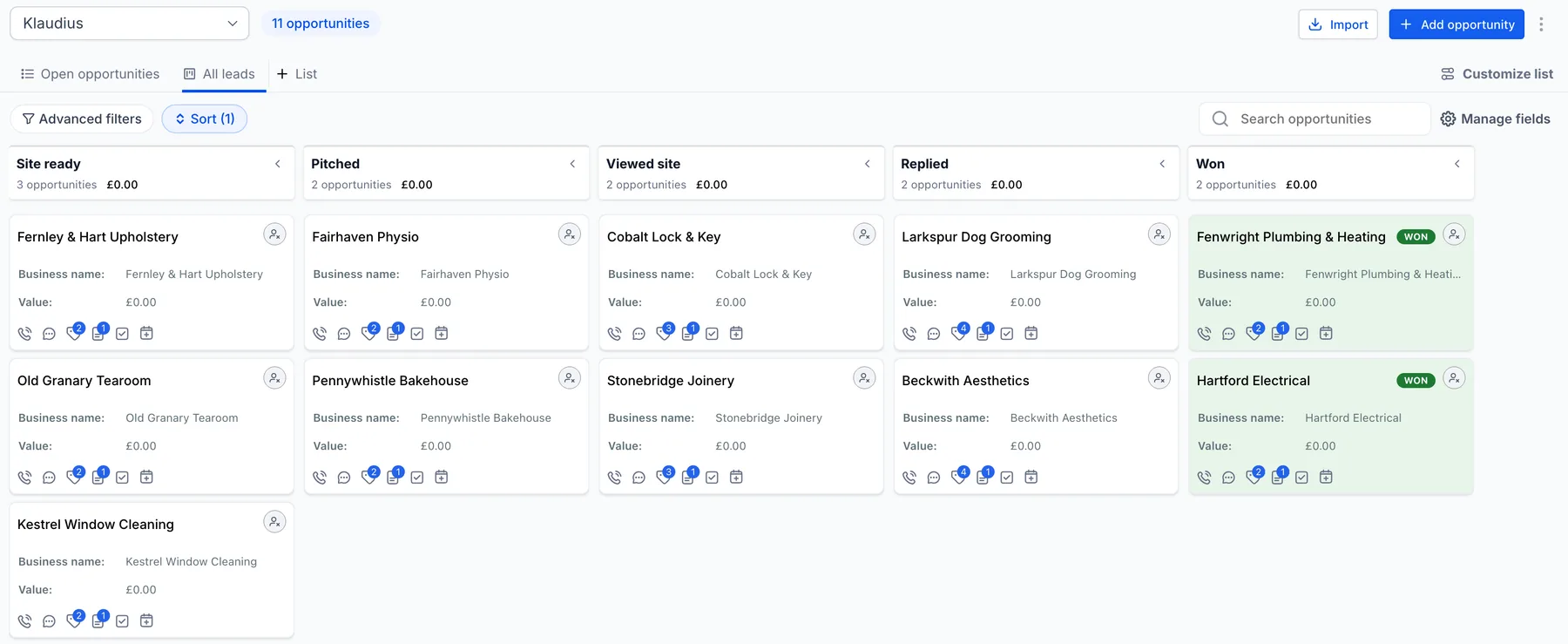
The deal moves as the lead does, without you touching it. A lead that says no, never answers or can't be reached is tagged as lost and its deal is closed: as lost if they said no, otherwise as abandoned. A business that says no is also set to Do Not Disturb, so your workflows leave it alone.
Every contact carries tags you can build on: klaudius on all of them, plus one for where the lead stands (klaudius-site-ready, klaudius-pitched, klaudius-replied, klaudius-won or klaudius-lost). Klaudius keeps one stage tag at a time, so a contact tagged klaudius-replied is one that has replied and not yet decided. It also fills in contact fields for the site, the pitch and the visits.
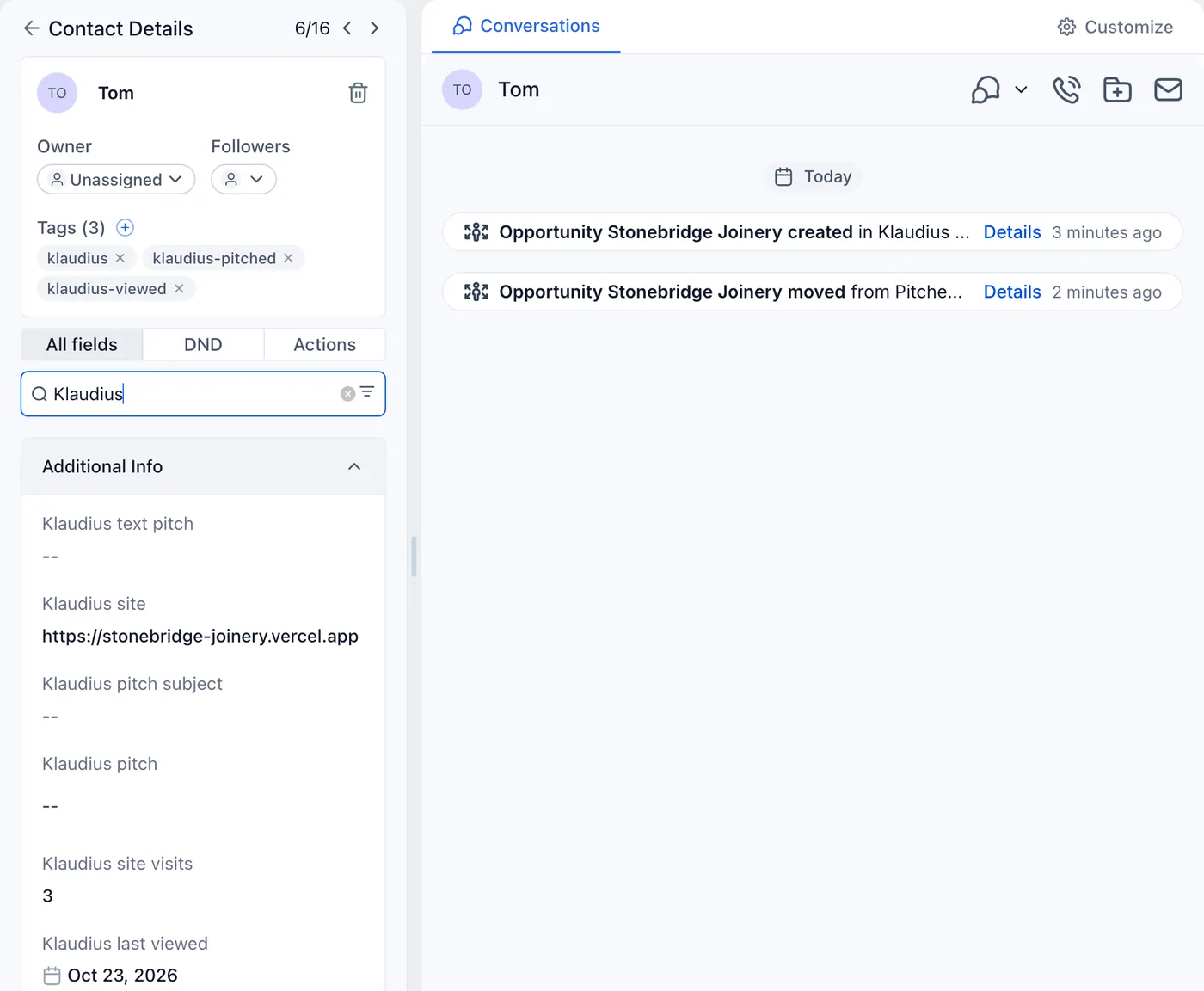
klaudius-viewed, its visits counted, and its deal moved on from Pitched.Already have leads in Klaudius? Add existing leads sends them across. Klaudius asks first, because any workflow you've set to start on a new contact or a Klaudius tag will run for each one.
When they open the site, GoHighLevel knows
Every site Klaudius builds for a pitch can tell you when the business opens it. That now reaches GoHighLevel too. On a business's first visit after the pitch, its contact is tagged klaudius-viewed; each visit updates the visit count and the date it was last seen, and moves a deal still at Pitched on to Viewed site. A deal you've moved yourself stays where you put it.
Visits count the way visit alerts count them: only once the pitch has gone out, and never your own. The update goes to GoHighLevel from your computer, so your GoHighLevel token never leaves it: within a couple of minutes while the Klaudius app is open, otherwise the next time follow-ups run.
Your workflows, started by Klaudius
Any Klaudius tag can start a GoHighLevel workflow, so the signals Klaudius picks up become actions in the tool you already use. A few to start with:
- Call them while they're interested. Start on
klaudius-viewedand send yourself an internal notification, to the GoHighLevel app on your phone if you use it: "{{contact.name}} just opened the site you built them." Add a task to call them. - Know the moment they reply. Start on
klaudius-repliedand notify yourself, with the conversation one tap away. - Nudge a reply that went quiet. Start on
klaudius-replied, wait a few days, then check whether the contact still has the tag. If it does, they've replied but not decided, so remind yourself. - Ask a new client for a review. Start on
klaudius-wonand send a review request for your own agency, with GoHighLevel's three-day "follow up manually" note after it. Its default "New Sale" workflow does most of this already; point its trigger at the tag.
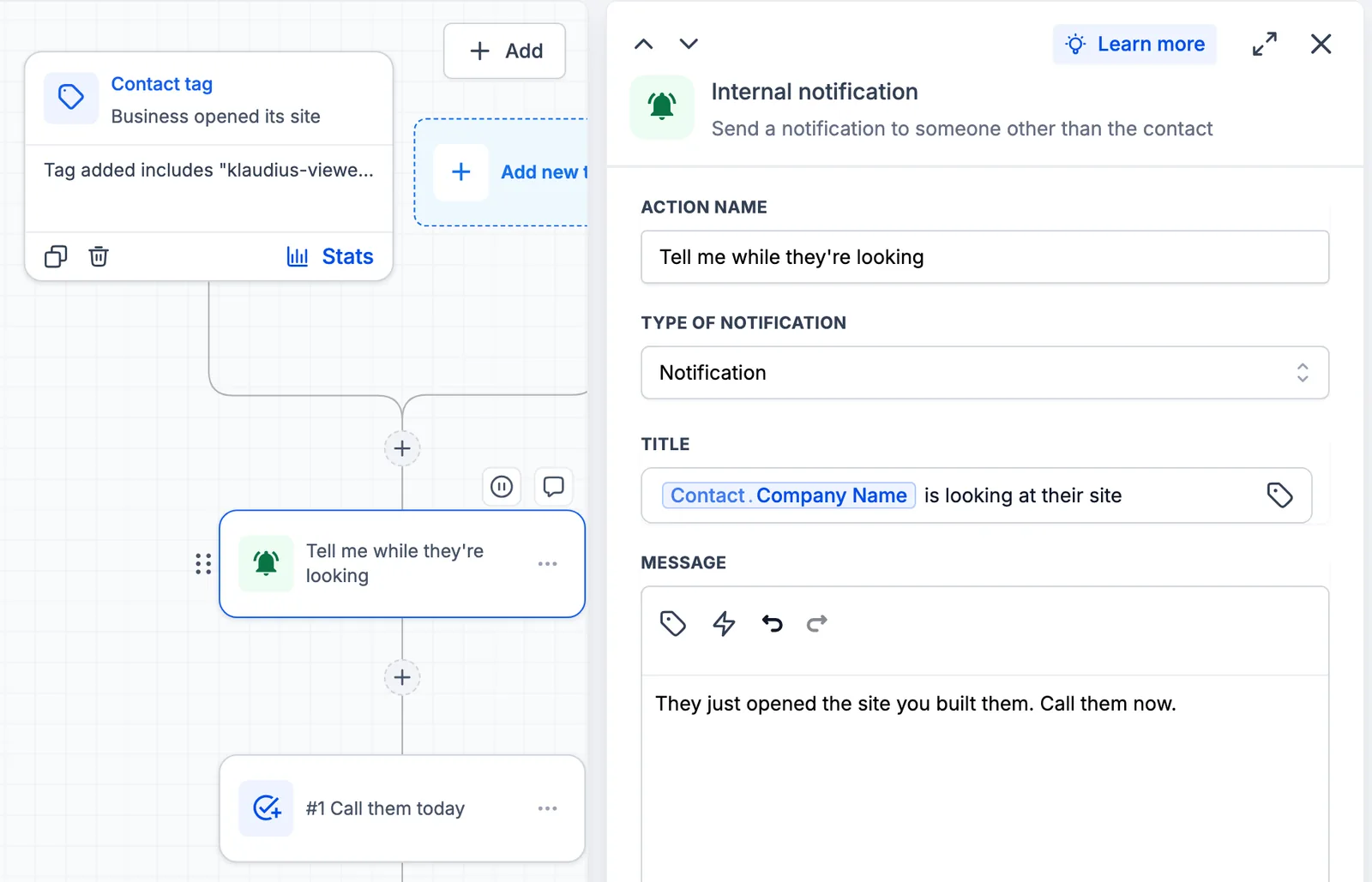
klaudius-viewed tag: a notification while the business is looking, then a task to call them.Two things worth knowing when you build them. A tag trigger only runs for tags added after the workflow is published, so publish first, then add your existing leads. And start from the Klaudius tags, or filter on klaudius: a workflow that starts on any new contact runs for every lead Klaudius adds.
Or let GoHighLevel send the pitch
By default Klaudius sends its own pitches and GoHighLevel keeps the record. If you'd rather GoHighLevel did the sending, from your sub-account and through your own follow-up sequence, switch off Send outreach automatically.
Klaudius then writes each first message as usual but, instead of sending it, puts it into the contact's pitch fields (subject and body) and tags the contact klaudius-pitch-ready. A workflow that starts on that tag and sends an email from those fields takes it from there: it sends, follows up and moves the deal. Klaudius also writes a short text-message version into its own field, for a workflow that sends a text instead.
What makes this work is that Klaudius keeps reading. Each time follow-ups run, and every 15 minutes while the app is open and not busy, it reads the lead's conversation in GoHighLevel. Once it sees your workflow has sent the pitch, the lead counts as pitched and its visits start counting. When the business replies, the reply turns up in Klaudius's Inbox and daily follow-ups like a reply on any other channel, and the lead and its deal move on to replied, or to lost if they say no.
You answer in GoHighLevel: Klaudius never sends on that conversation and leaves the follow-ups to your workflow. Draft a reply still writes one for you to paste in.
Moving a client's site into GoHighLevel
Some clients want everything in one place, and some agencies host every client site in GoHighLevel. So when a client signs, Klaudius can now move the site it built them into the client's sub-account as an AI Studio project: the same design and the same content, published from AI Studio, with every enquiry from its forms arriving in that sub-account as a contact. The sub-account can be in your agency's GoHighLevel or in one the client owns.

Pick Move to GoHighLevel under Client add-ons, choose the client, and Klaudius asks for a few things in one message: a new AI Studio project in the client's sub-account (it gives you the one-line prompt to start it, which costs a few cents), the project's GitHub repository, which AI Studio creates privately when you connect it, the project's address, and the sub-account's tracking code.
Klaudius then rebuilds the site in AI Studio's format, page by page, and compares the result with the original before it sends anything. Every enquiry form is wired so each enquiry becomes a contact, and the form's own email still goes out, so the business keeps getting its enquiries the way it always has. The result appears in the project in AI Studio: check the preview, press Publish, and connect the client's domain there.
A few things to know before you offer it:
- After the move, the site lives in AI Studio. Changes are made there, by you or by AI Studio's AI, and Klaudius's edits and add-ons no longer reach it.
- Some sites stay where they are. The client editor, the booking system and the live Google rating run on your own hosting, so Klaudius won't move a site that has them.
- Costs. Publishing from AI Studio is free. AI Studio's AI is paid usage in GoHighLevel, and a sub-account holds a limited number of AI Studio projects.
Setting it up
Nothing reaches GoHighLevel until you connect it. To connect, open the app's Settings → GoHighLevel. You need two things from your sub-account: a Private Integration token with the permissions the docs list, and the sub-account's Location ID (paste its whole address and Klaudius picks the ID out). Press Connect, choose where deals go, and press Save.
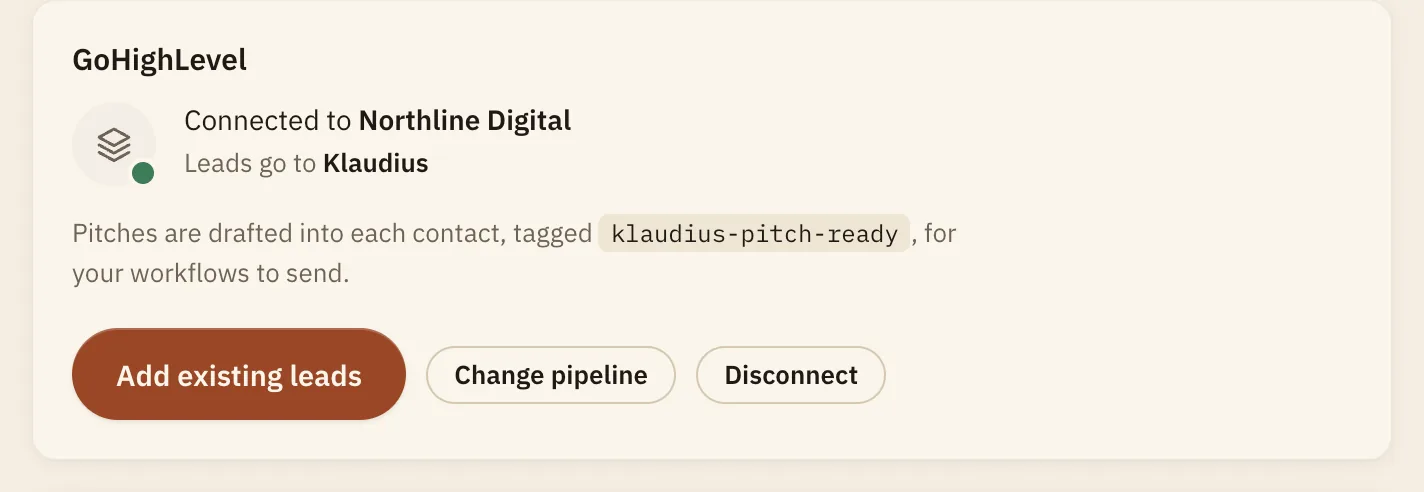
Disconnect stops Klaudius adding or updating anything in GoHighLevel at any point. The contacts already there stay.
What it doesn't do
- It doesn't send through GoHighLevel itself. Either Klaudius sends its own pitches, or your workflows send them. It never sends on a GoHighLevel conversation.
- It can't see a sale you close in GoHighLevel. When a client buys, mark them as won in Klaudius, and the contact and deal follow.
- It isn't a GoHighLevel app. GoHighLevel is HighLevel's product. Klaudius connects to your sub-account with the token you create, from your own computer, and isn't affiliated with HighLevel.
The full steps are in the docs: GoHighLevel and Move a site into GoHighLevel.